Link previews

See live, synced visualizations of links from popular platforms right in your workspace — no need to switch between apps or lose context 🔗
ข้ามไปยังคำถามที่พบบ่อยLink previews allow you to see live, synced visualizations of links directly in Notion. This is currently supported for several platforms:
GitHub | Jira |
Slack | Asana |
Trello | Linear |
Zoom | Figma |
Adobe XD | Dropbox |
OneDrive & Sharepoint | Pitch |
Amplitude | Hex |
GRID | GitLab |
Box | Lucid (Lucidspark and Lucidchart) |
Whimsical | ClickUp |
Zendesk |

Note: Users will need edit access in SharePoint and OneDrive in order to use link previews.
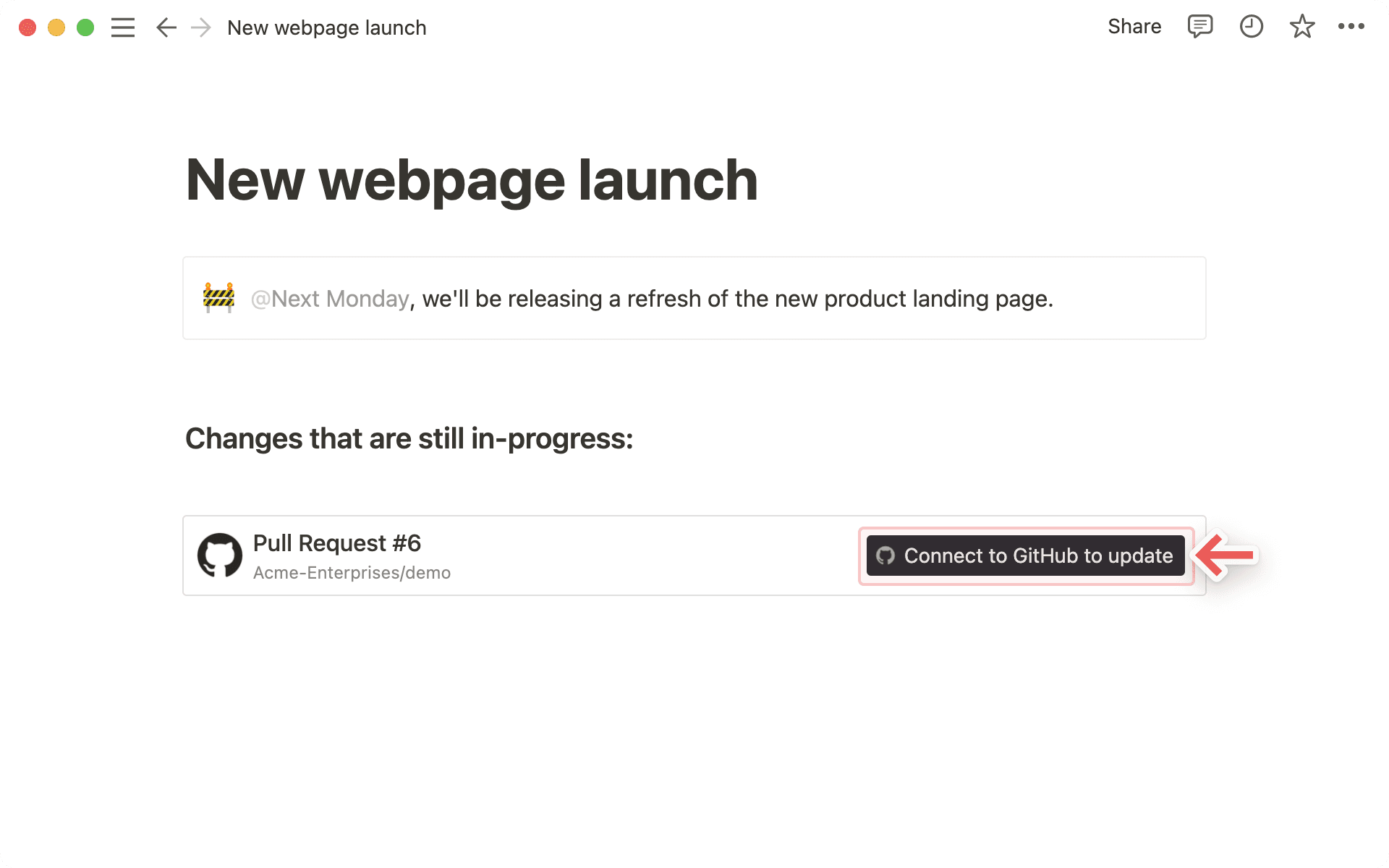
Copy a link from any of the supported platforms. Paste it into Notion and select
Paste as: Preview.The first time that you paste a link from one of these platforms, you'll see a button that asks you to connect to the app.
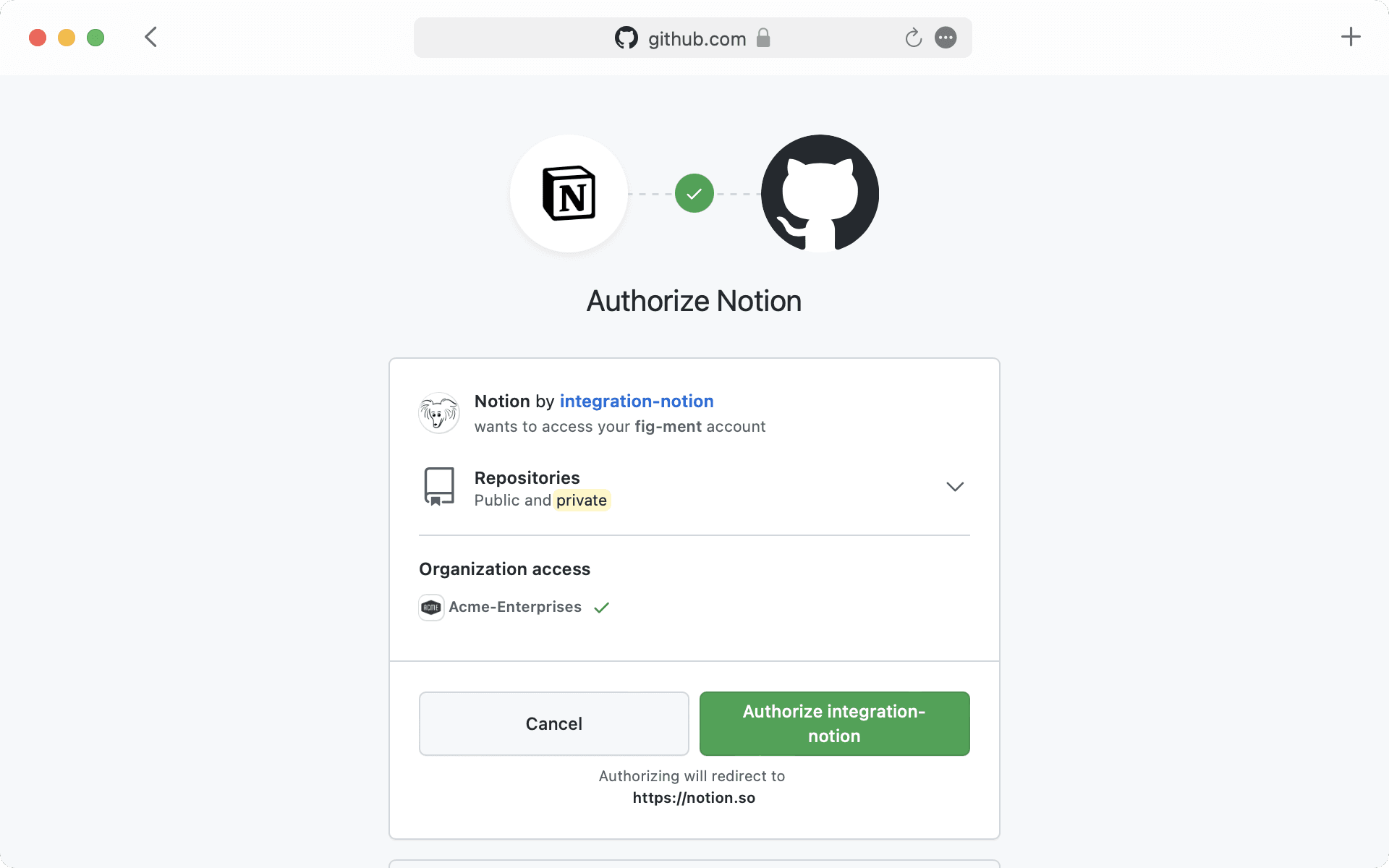
Once you click the button to connect, you'll be redirected to a browser window. Here, the app will ask for authentication and permission to display content in Notion.
When you've authenticated with the app, you'll see a detailed preview of the linked content. This preview updates as changes are made to any relevant fields.
Note: Once you've authenticated a connected app, anyone who can view your Notion page will be able to see corresponding content that you've pasted as a link preview.
In some cases, information will be abstracted (e.g., channel names from Slack private channels and DMs).
In addition to previews, you can also paste links from these platforms as mentions. These provide a more condensed visualization of the content in the link.
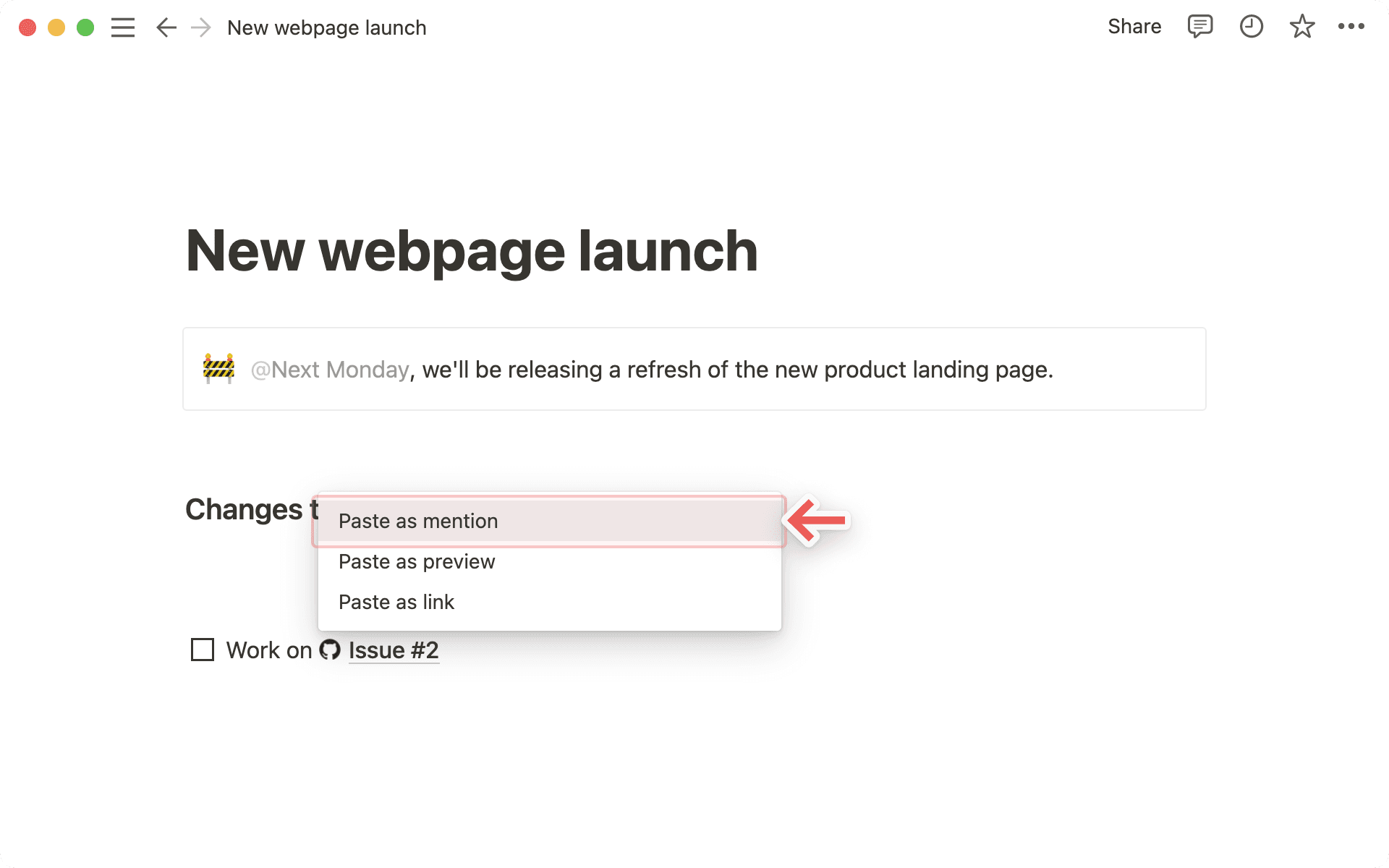
Copy a link from any of the supported platforms. Paste it into Notion and you'll see the option to
Paste as: Mention.Similarly to previews, you'll have to authenticate the app the very first time you paste a corresponding link in Notion. Click the button to open the authentication window and grant the necessary permissions. Afterward, you'll see the link mention pop up!

Tip: You can paste links as mentions directly inline, next to other text!
คำถามที่พบบ่อย
ฉันได้รับข้อผิดพลาด "Access denied" (ปฏิเสธการเข้าถึง) หรือ "Content not found" (ไม่พบเนื้อหา) ในตัวอย่างลิงค์ของฉัน.
ฉันได้รับข้อผิดพลาด "Access denied" (ปฏิเสธการเข้าถึง) หรือ "Content not found" (ไม่พบเนื้อหา) ในตัวอย่างลิงค์ของฉัน.
มีสาเหตุที่เป็นไปได้สองประการสำหรับเรื่องนี้:
คุณอาจยังไม่ได้ยืนยันตัวตนด้วยบัญชีที่มีสิทธิ์เข้าถึง คุณสามารถเชื่อมต่อหลายบัญชีได้ผ่าน
การตั้งค่า→การเชื่อมต่อของฉันหรือเมนูแบบเลื่อนลงของข้อผิดพลาด.
ฉันสามารถเพิ่มการเข้าสู่ระบบมากกว่าหนึ่งรายการสำหรับการเชื่อมต่อตัวอย่างลิงค์ได้หรือไม่?
ฉันสามารถเพิ่มการเข้าสู่ระบบมากกว่าหนึ่งรายการสำหรับการเชื่อมต่อตัวอย่างลิงค์ได้หรือไม่?
คุณทำได้! คุณสามารถทำได้ผ่าน การตั้งค่า → การเชื่อมต่อของฉัน สำหรับการเชื่อมต่อที่ต้องการ ให้เลือก “เชื่อมต่อบัญชีอื่น”
หมายเหตุ: แอพพลิเคชันบางตัวไม่รองรับการเข้าสู่ระบบหลายบัญชีในเบราว์เซอร์ (เช่น GitHub) ดังนั้นคุณอาจต้องออกจากระบบบัญชีใดก็ตามที่เข้าสู่ระบบอยู่ในเบราว์เซอร์ของคุณ เพื่อให้ระบบแจ้งให้คุณเข้าสู่ระบบด้วยบัญชีอื่น
เราจะกำหนดว่าบัญชีใดของคุณที่จะใช้เพื่อดูตัวอย่างทรัพยากรที่กำหนด และจะแสดงข้อผิดพลาดหากไม่มีบัญชีใดสามารถใช้งานได้สำเร็จ
ฉันได้รับข้อผิดพลาดทั่วไป “ไม่สามารถโหลดตัวอย่าง” ในตัวอย่างลิงก์
ฉันได้รับข้อผิดพลาดทั่วไป “ไม่สามารถโหลดตัวอย่าง” ในตัวอย่างลิงก์
ทำตามขั้นตอนเหล่านี้เพื่อแก้ไขปัญหา
ยืนยันว่าคุณได้ยืนยันตัวตนด้วยบัญชีที่ถูกต้องสำหรับทรัพยากรนั้นแล้ว
ยืนยันว่าไม่มีข้อจำกัดการเข้าถึงสำหรับองค์กรของคุณ
ลองเปิดตัวอย่างลิงค์ใหม่อีกครั้ง
สุดท้าย หากวิธีอื่นไม่ได้ผล โปรดติดต่อฝ่ายสนับสนุน! น่าเสียดายที่เราไม่สามารถช่วยแก้ไขข้อผิดพลาดที่เกี่ยวข้องกับ Access denied หรือ Content not found โปรดระบุข้อมูลต่อไปนี้เมื่อติดต่อฝ่ายสนับสนุน:
การเชื่อมต่อที่คุณพยายามใช้
ข้อความแสดงข้อผิดพลาดและรหัส
URL ที่คุณพยายามดูตัวอย่าง (ถ้าเป็นไปได้)